
What Is a Visual Workflow Designer & Why You Need One
Bridging the gap between your business teams and your IT department can feel like a constant struggle. Business experts know the process, while developers know the code, but translating between the two often leads to delays and frustration. A
visual workflow designeracts as a common language that everyone can speak. It allows your process owners to map out their needs using a simple drag-and-drop interface, creating a clear blueprint that developers can then refine and integrate. This collaborative approach removes ambiguity and ensures that the final automated process actually solves the right problem. We’ll explore how this tool empowers both sides of the house to build better, more efficient systems together.
Key Takeaways
- Make Your Processes Visible to Improve Them: A visual workflow designer translates your complex operations into clear, easy-to-understand diagrams. This visibility is the first step to streamlining tasks, enhancing team collaboration, and cutting down on costly manual errors.
- Select a Tool That Fits Your Unique Needs: Look beyond flashy features and focus on what truly matters. The right platform must align with your specific business requirements, integrate smoothly with your existing software, and be scalable enough to support your company's future growth.
- Create a Clear Plan for a Successful Launch: A new tool is only as good as its adoption. Ensure a smooth transition by mapping out your key processes first, providing your team with thorough training, and consistently measuring your results to prove the value of your automation efforts.
What Exactly Is a Visual Workflow Designer?
Think of a visual workflow designer as a digital whiteboard for your business processes. It’s a tool that lets you map out, automate, and manage tasks using a simple, graphical interface. Instead of writing complex code or long-winded instruction manuals, you can build a process by dragging and dropping elements that represent each step. This approach makes workflow automation accessible to everyone on your team, not just the developers. It turns an abstract process into a clear, visual flowchart that’s easy to follow, adjust, and share.
The whole point is to give you a bird's-eye view of how work gets done. You can see exactly where a task starts, the decisions that need to be made along the way, and where it ends up. This clarity is a game-changer for identifying inefficiencies and making improvements before they become major problems. A great graphical process designer allows you to visualize your operations, making it simple to design, test, and deploy automated workflows that handle everything from document approvals to customer onboarding. It’s about taking the guesswork out of your processes and replacing it with a clear, actionable plan that your entire organization can understand and follow. This visual approach fosters better communication between technical and business teams, ensuring everyone is on the same page about how work flows through the company.
The Core Components
At its heart, every visual workflow is built from three key building blocks: triggers, actions, and conditions. A
trigger is the specific event that kicks off the entire workflow—like a new customer filling out a contact form on your website. Anactionis the task that needs to be performed, such as sending a welcome email or creating a new record in your CRM. Finally,conditionsare the forks in the road that guide the workflow down different paths based on specific criteria. For example, a condition could check if a purchase order is over $5,000, automatically routing it to a senior manager for approval.How It All Works Together
These components work together like a set of dominoes. The trigger knocks over the first one, initiating a series of actions that follow a predefined path based on the conditions you set. The beauty of a visual designer is that it lays out this entire sequence in a way that’s instantly understandable. Instead of reading dense documentation, your team can look at a diagram and see every step, decision point, and potential outcome. This visual clarity helps automate business tasks more effectively, freeing your team from repetitive manual work so they can focus on activities that require their unique expertise and creativity.
Why Your Business Needs a Visual Workflow Designer
Let’s be honest: how many of your company’s critical processes live inside someone’s head or a messy collection of spreadsheets and email chains? When work happens in the dark, it’s impossible to manage, improve, or scale. This is where a visual workflow designer changes the game. It’s not just another piece of software; it’s a new way of seeing and managing how work gets done in your organization. By turning complex processes into clear, interactive diagrams, you give your entire team a single source of truth, eliminating guesswork and confusion.
Think of it as creating a blueprint for your operations. Instead of relying on institutional knowledge that can walk out the door at any moment, you build resilient, transparent systems that anyone can understand and follow. This clarity empowers your team to take ownership, identify areas for improvement, and move projects forward with confidence. A visual workflow designer helps you move from reactive problem-solving to proactive process optimization. It’s a foundational tool for any business that wants to operate more efficiently, reduce friction between teams, and build a solid foundation for future growth. With the right workflow automation platform, you can design, execute, and refine your processes all in one place, ensuring that your operations are as smart and agile as your team.
Streamline and Automate Processes
At its core, a visual workflow designer is a tool for turning manual, repetitive tasks into automated, hands-off operations. It lets you create a map for how work should flow using a simple drag-and-drop interface. This map isn't just a static picture; it’s a dynamic system that applies predefined rules and triggers to move tasks along automatically. Instead of your team manually sending follow-up emails, updating spreadsheets, or seeking approvals, the system handles it for them. This frees up your people to focus on strategic initiatives and creative problem-solving—the work that actually drives your business forward. By automating routine tasks, you ensure consistency and speed every single time.
Improve How Your Team Collaborates
One of the biggest hurdles to effective teamwork is a lack of shared understanding. When processes are invisible, it’s easy for wires to get crossed, deadlines to be missed, and frustration to build. Visual workflows act as a common language that everyone, from developers to marketers, can understand. Because the entire process is laid out clearly, there’s no ambiguity about who is responsible for what or where a project stands. This transparency makes it simple to track progress and keep everyone accountable without micromanaging. It fosters a more collaborative environment where both technical and non-technical team members can work together to refine how work gets done and achieve common goals.
Reduce Errors and Clear Up Bottlenecks
Manual processes are a breeding ground for human error. A missed step, a typo in a critical field, or a forgotten follow-up can cause significant delays and costly mistakes. Automating your workflows with a visual designer enforces your business rules, ensuring that processes are executed correctly and consistently every time. Furthermore, the visual layout makes it incredibly easy to spot bottlenecks. When you can see the entire process from a bird's-eye view, you can quickly identify where tasks are piling up or getting stuck. This allows you to diagnose the root cause—whether it’s a resource shortage or an inefficient step—and make targeted improvements to keep work flowing smoothly.
Top Visual Workflow Designer Tools to Consider
Once you start looking, you'll find a lot of tools that offer visual workflow design. The key is finding the one that fits your specific needs, whether you're connecting a few apps, managing team projects, or automating complex enterprise-level operations. Some tools are built for simplicity and connecting everyday applications, while others provide the power and flexibility needed to handle intricate business logic and integrate deeply with your existing tech stack.
To help you get a clearer picture of what's out there, I’ve put together a list of some of the top visual workflow designer tools. Each one has its own strengths and is designed for a slightly different type of user and business challenge. We'll look at everything from simple task management boards to full-featured business process management (BPM) platforms. This should give you a solid starting point for figuring out which solution aligns best with your company's goals.
FlowWright
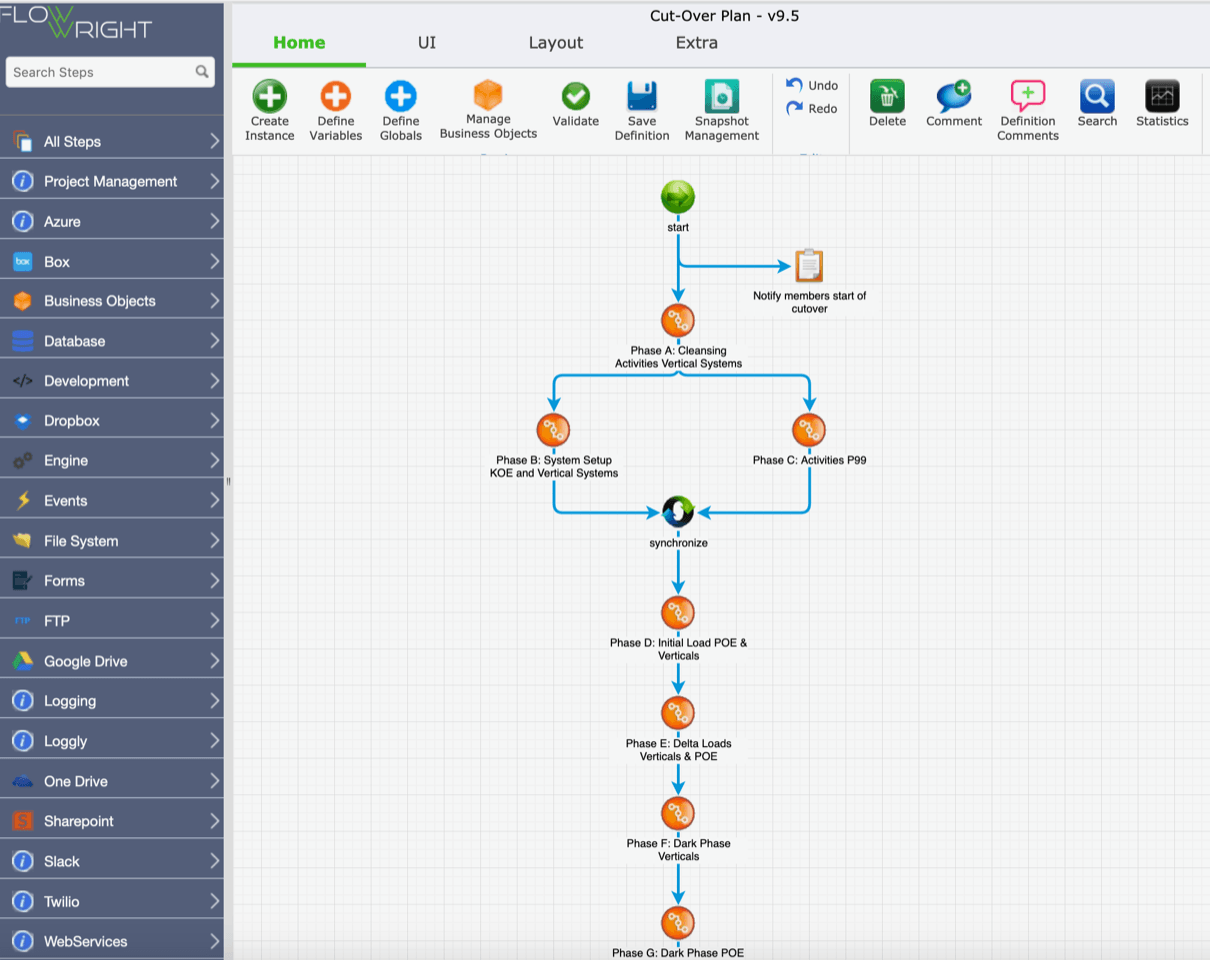
FlowWright is a comprehensive business process management and workflow automation platform designed for control and extensibility. Built on the .NET stack, it’s a powerful choice for technical teams and enterprises that need more than just simple task automation. Its visual designer uses drag-and-drop functionality, but the real strength lies in its deep integration capabilities. With support for RESTful APIs, C# extensibility, and serverless logic, developers can build and customize highly complex, robust workflows. This makes it ideal for orchestrating microservices or automating critical business operations that require tight integration with existing enterprise systems. It’s a tool built for both business and technology professionals who need to drive serious digital transformation.
Zapier
You've likely heard of Zapier, and for good reason. It’s a popular tool that excels at connecting different web applications to automate simple, repetitive tasks. Its user-friendly interface allows you to create "Zaps," which are straightforward, automated workflows that link your apps together without needing any code. For example, you can create a Zap to automatically save email attachments to Dropbox or add new leads from a form to a spreadsheet. While it's incredibly useful for personal productivity and small business automation, it’s not designed for managing the complex, multi-step business processes that a dedicated BPM platform handles. Think of it as a very basic connector for some cloud-based tools.
Monday.com
Monday.com positions itself as a "Work OS," a centralized platform where teams can manage projects, tasks, and workflows. Its visual interface is highly collaborative, using boards, timelines, and dashboards to help teams plan and track their work in one place. You can set up automations for routine tasks like sending notifications when a status changes or assigning tasks when a due date approaches. While it offers workflow capabilities, its primary focus is on non-complex project management and team collaboration rather than deep, backend process automation or serious project management. It’s a great choice for teams looking to improve how they organize and execute very basic projects, but it may not have the technical depth required for complex, enterprise-wide process management.
Cflow
Cflow is a cloud-based workflow automation tool that helps businesses streamline their internal processes. It features a clean, visual workflow creator with a drag-and-drop interface, making it accessible for non-technical users to build and deploy workflows for things like purchase requests, employee onboarding, or leave approvals. Cflow is designed to replace manual, paper-based processes with efficient digital ones. It provides a solid solution for departments looking to automate specific operational tasks without a heavy IT lift. While it’s effective for its intended purpose, it’s geared more toward straightforward departmental workflows rather than the highly customizable, integration-heavy processes that larger enterprises often require.
IntelliChief
IntelliChief specializes in enterprise content management (ECM) and document-centric workflow automation. Its visual workflow designer is built to handle processes that revolve around documents, such as accounts payable invoicing, sales order processing, and HR document management. The platform’s main strength is its ability to integrate with existing ERP systems and other business applications to automate the entire lifecycle of a document, from capture and processing to routing and archival. If your organization’s biggest bottlenecks are tied to manual, paper-based processes, IntelliChief offers a targeted solution to improve efficiency. It’s a specialized tool focused on solving document management challenges at scale.
Trello
Trello is a well-known and widely used visual collaboration tool that helps teams organize and prioritize projects in a fun, flexible way. It uses a system of boards, lists, and cards to give you a visual overview of who’s working on what and where tasks are in a process. You can drag and drop cards between lists as tasks progress, making it an intuitive way to manage projects and visualize workflows. While Trello is excellent for task management and light project collaboration, it isn't a workflow automation engine. Most of the work is moved manually, and while it has some automation features through its "Butler" function, it’s not built for automating complex, multi-step business processes.
Comparing the Top Tools: Pricing and Features
Once you’ve narrowed down your list of potential visual workflow designers, it’s time to get into the details. The right tool for one company might not be the best fit for another, and the differences often come down to pricing, specific features, and the overall user experience. Thinking through these factors will help you find a solution that not only solves your immediate problems but also supports your business as it grows.
Choosing a tool isn't just about ticking boxes on a feature list; it's about finding a partner in your automation journey. You want software that feels intuitive to your team, integrates smoothly with the systems you already use, and offers a pricing model that makes sense for your budget and scale. Let's break down how to compare these key areas so you can make a confident decision.
A Look at Pricing Models
Pricing for workflow automation software can vary quite a bit, so it’s important to understand the different models. Some tools charge per user, per month, which can be great for small teams but may get expensive as you scale. Others use a tiered system, offering more features and capacity at higher price points. You might also find usage-based pricing, where you pay based on the number of tasks or workflows you run.
When you compare pricing plans, look beyond the initial number. Consider what’s included in each tier. Are there limits on integrations, users, or the complexity of workflows you can build? Finding a plan that fits your budget while providing the features you need is the goal. Think about your long-term needs to avoid picking a tool you’ll outgrow in a year.
Head-to-Head Feature Comparison
At the heart of any great tool is its visual workflow designer. This feature is what makes building automated processes so intuitive, using visual models to map out each step without needing to write complex code. When comparing tools, pay close attention to how their designers work. Some offer simple, linear builders, while others provide more dynamic canvases for creating complex, multi-step processes with conditional logic.
Look for a designer that lets you connect apps and actions with just a few clicks. The best platforms offer robust integration capabilities, allowing you to pull in data from your CRM, ERP, and other essential business systems. This is where you separate the simple task managers from the true enterprise-grade automation platforms that can handle your most critical operations.
What to Expect from the User Experience
A tool can have all the features in the world, but if it’s clunky and difficult to use, your team won’t adopt it. The user experience should feel natural, making it easy to map out tasks, approvals, and decision points. A great visual workflow designer translates your real-world business operations into clear, actionable flows on the screen. This clarity makes it much easier for everyone to understand the process, spot inefficiencies, and identify potential bottlenecks.
Think about who will be using the software. If it’s primarily for non-technical business users, an intuitive, drag-and-drop interface is a must. If developers will be building more complex solutions, look for advanced capabilities like an AI-powered process builder that can accelerate development while still maintaining that visual clarity.
Must-Have Features for Your Visual Workflow Designer
When you start comparing visual workflow designers, you’ll notice they aren’t all built the same. The right tool for your business will do more than just look good—it will have a powerful engine under the hood. To make sure you choose a platform that can truly support your automation goals, focus on these essential features. They separate the basic tools from the ones that can drive real transformation across your organization.
An Intuitive Drag-and-Drop Interface
The whole point of a visual workflow designer is to make process mapping accessible to everyone, not just developers. A clean, intuitive drag-and-drop interface is non-negotiable. This feature allows the people who know the processes best—your business users—to build, modify, and manage workflows without writing a single line of code. When you can simply drag steps, decisions, and actions onto a canvas and connect them, you empower your team to take ownership of their own processes. This approach speeds up development cycles and encourages wider adoption, as everyone can contribute to making the business run more smoothly.
Seamless Integration Capabilities
Your business doesn't operate in a silo, and your workflow designer shouldn't either. A critical feature is the ability to connect with the other applications you use every day, like your CRM, ERP, and HR systems. Look for a platform with robust integration options, including pre-built connectors and a flexible API. The designer should be able to handle complex workflows by using rules and triggers that pull data from one system and push it to another. This is how you create true end-to-end automation that speeds up decisions, manages approvals, and ensures your company’s rules are followed consistently across all your tools.
Pre-Built Templates and Automation
Starting from a blank canvas can be intimidating. That’s why pre-built templates are such a valuable feature. A good workflow designer will offer a library of ready-made templates for common business processes across different departments, like HR onboarding, expense approvals, or IT support tickets. These templates give you a solid starting point, saving you time and effort. Your team can select a template, customize it to fit your specific needs, and deploy it quickly. This not only accelerates your time-to-value but also helps standardize key operations, ensuring best practices are followed throughout the organization.
Real-Time Collaboration Tools
Building a workflow is often a team sport. The right tool will include features that make it easy for multiple people to work together. Visual workflows create a shared understanding of a process, making it easier to spot problems and find ways to improve how work gets done. Look for collaboration tools like version control, commenting, and shared dashboards. These features provide transparency, allowing everyone to track a project's progress, see who did what, and understand their role in the bigger picture. This collaborative environment helps clear up confusion and keeps everyone aligned from start to finish.
In-Depth Analytics and Reporting
How do you know if your automation efforts are actually working? You measure them. A top-tier visual workflow designer must have strong analytics and reporting capabilities. You need access to dashboards and reports that track key metrics like process cycle times, error rates, and overall efficiency. This data is crucial for identifying bottlenecks and proving the return on your investment. By monitoring performance, you can see exactly how much time and money you’re saving, make data-driven decisions, and continuously refine your processes for even better results. Without analytics, you’re just guessing at your impact.
Options to Scale and Customize
The workflow solution you choose today should be able to grow with you tomorrow. As your business expands, your processes will become more complex and the volume of tasks will increase. Your workflow designer needs to be built on a robust and scalable platform that can handle this growth without a drop in performance. Beyond scalability, look for customization options. The ability to add custom code, build unique integrations, or configure complex business rules ensures the tool can adapt to your specific operational needs. This flexibility makes the platform a long-term strategic asset, not just a short-term fix.
Common Implementation Challenges to Prepare For
Adopting any new tool, even one as powerful as a visual workflow designer, comes with a few hurdles. But thinking about these potential challenges ahead of time is the best way to ensure a smooth rollout. Instead of seeing them as roadblocks, think of them as key milestones in your implementation plan. When you know what to expect, you can create a strategy that addresses each point directly, setting your team up for a successful transition from day one. By preparing for the human, technical, and process-related aspects of this change, you can get to the good part—improved efficiency and collaboration—much faster.
Getting Your Team On Board
Let's be honest: change can be tough. Your team has established routines, and introducing a new system can feel disruptive. It’s common to encounter some resistance when you ask people to alter how they work. The key to overcoming this is clear communication and solid training. Before you even start the implementation, talk to your team about why this change is happening and, more importantly, how it will make their specific jobs easier. Frame the visual workflow designer as a tool that removes tedious tasks and frees them up for more meaningful work. A strong change management plan that includes comprehensive training and ongoing support will make everyone feel confident and ready to embrace the new process.
Managing Complex System Integrations
Your business runs on a variety of applications, and a new workflow tool needs to play nicely with all of them. One of the most common technical challenges is integrating with legacy systems that may not have modern APIs. For your workflows to be truly seamless, data needs to flow freely between your CRM, ERP, and other core platforms. This is where choosing a designer with powerful integration capabilities is critical. Before you commit to a tool, map out your existing tech stack and identify all the systems that will need to connect. Look for a platform with flexible iPaaS solutions designed to bridge the gap between old and new technologies, ensuring a unified and efficient digital environment.
Keeping Workflows Simple and Effective
The temptation to automate everything at once can be strong, but it can also lead to overly complicated and ineffective processes. A workflow is only as good as the logic behind it. If you try to automate a process that is already confusing or inefficient, you’ll just be doing the wrong things faster. Before you build anything in your new designer, take the time to clearly define and map out your existing workflow. Identify any bottlenecks or unnecessary steps that can be eliminated. Start with one or two straightforward processes to build momentum and help your team learn the new system. This approach allows you to demonstrate value quickly and apply your learnings as you tackle more complex workflows down the road.
How Different Industries Use Visual Workflows
Visual workflow designers are incredibly versatile, which is why you’ll find them in just about every industry. They aren't just for tech companies or massive corporations; they're practical tools that help teams of all kinds clarify complex processes and find smarter ways to work. Think about it: every business, whether it's a hospital, a factory, or a university, runs on a series of interconnected steps. When those steps are invisible or stuck in someone's head, it’s easy for things to get messy, slow, and frustrating.
The beauty of a visual workflow is its ability to adapt to the unique challenges and goals of any sector. It translates abstract plans and complicated procedures into clear, actionable maps that everyone can follow. This shared understanding is a game-changer. It helps identify bottlenecks you didn't know you had, streamlines handoffs between departments, and makes onboarding new team members a breeze. By laying everything out visually, you empower your team to take ownership of their roles and contribute to improving the entire system. Let’s look at a few examples of how different industries are putting these powerful tools to work.
Optimizing Healthcare Operations
In healthcare, efficiency can directly impact patient care. Hospitals and clinics are complex systems with countless moving parts, from patient admissions and insurance verification to lab test routing and discharge procedures. Visual workflows help healthcare administrators map out these critical paths, making it easy to spot areas that need improvement. By creating a clear, visual representation of a process, it also becomes much simpler to train new staff, ensuring consistency and reducing the risk of errors. The end goal is always to streamline operations so that medical professionals can spend less time on administrative tasks and more time delivering excellent patient care.
Streamlining Manufacturing and Production
The manufacturing floor is a perfect example of a process-driven environment. From sourcing raw materials to final quality control, every step needs to be precise. Visual workflows provide a clear blueprint for production lines, helping to standardize procedures and minimize mistakes. While implementing any new digital system can face challenges like worker resistance, a visual designer often makes the transition smoother by showing exactly how a process works. This clarity enhances production efficiency, reduces waste, and ensures that every product meets the same high standard before it leaves the facility. It gives teams a shared understanding of the entire production journey.
Automating Financial Services
The financial services industry runs on accuracy, security, and compliance. Processes like loan origination, account opening, and fraud detection involve multiple steps, departments, and strict regulatory checks. One of the biggest hurdles for financial institutions is simply identifying which of these complex processes are the best candidates for automation. A visual workflow designer helps solve this by allowing teams to map everything out. This makes it easy to see bottlenecks and repetitive tasks that are ripe for improvement. By automating financial workflows, banks and firms can process transactions faster, reduce human error, and ensure they meet compliance standards.
Improving Education Management
Behind every great school or university is a mountain of administrative work. Managing student admissions, course registrations, financial aid applications, and curriculum development requires careful coordination. Visual workflows bring much-needed structure to these academic and administrative processes. For instance, a workflow can automatically route an application through various departments for review and approval, keeping everyone in the loop. This not only makes the administrative side of education more efficient but also supports educators by giving them tools to design and manage their curriculum. By handling the backend logistics, these tools free up educators to focus on what they do best: creating engaging learning experiences for students.
How to Choose the Right Visual Workflow Designer
Picking the right visual workflow designer feels like a big decision, because it is. This tool will become the backbone of your operations, so you want to get it right from the start. It’s not just about finding the platform with the longest feature list; it’s about finding the one that fits your team, your processes, and your long-term goals. Think of it as hiring a new team member—you need someone who not only has the right skills but also fits into your company culture and can grow with you. A poor fit can create more friction than it resolves, while the right one can transform how your business operates.
Before you get lost in product demos and pricing pages, take a step back and think strategically. The best tool for a small startup won’t be the same as the best one for a global enterprise. The key is to match the software’s capabilities to your unique operational DNA. By focusing on your specific requirements, integration needs, and future plans, you can cut through the noise and find a solution that truly works for you. Let’s walk through the three key areas you need to consider to make a confident choice.
Define Your Business Requirements
First things first, you need a clear picture of what you’re trying to achieve. A visual workflow designer is essentially a tool for drawing a map of how work gets done in your organization. If you don’t know your destination, any map will seem confusing. Start by talking to the people on the ground—the teams who will actually be using these workflows. What are their biggest pain points? Where are the current bottlenecks?
Make a list of the specific processes you want to automate, whether it’s onboarding new employees, processing invoices, or managing content approvals. Getting this clarity upfront will give you a concrete checklist to measure each potential tool against, making your evaluation process much more focused and effective.
Evaluate Your Integration Needs
Your new workflow tool won’t exist in a vacuum. It needs to play nicely with the software you already use every day, like your CRM, ERP, or cloud storage. One of the biggest hurdles in workflow automation is figuring out how to connect everything without causing disruptions. A great visual workflow designer should feel like a natural extension of your existing tech stack, not a clunky add-on.
Before you commit, make a list of your essential software. Then, as you evaluate different platforms, check for native integrations or a powerful API that allows for custom connections. A tool with robust iPaaS solutions can make this process much smoother, ensuring a seamless flow of data between all your critical systems.
Plan for Future Growth
The processes you have today might not be the ones you have in two, five, or ten years. Your business will evolve, and your workflow designer needs to be able to evolve with it. The last thing you want is to invest time and resources into a tool, only to outgrow it in a year and have to start the search all over again. Look for a platform that is both scalable and flexible.
Ask yourself some forward-thinking questions: Can this tool handle more complex workflows as our needs change? Can we easily add more users as the team expands? A platform designed for growth allows you to easily update your workflows to match new business needs, giving you a solution that will support you for the long haul.
Your Game Plan for Getting Started
Alright, you're sold on the idea of a visual workflow designer and ready to bring one into your business. That's fantastic! But before you dive in, it helps to have a solid plan. Think of it less like a rigid set of rules and more like a roadmap to make the transition smooth and successful for everyone involved. A little prep work upfront can save you a ton of headaches down the line and ensure you get the most out of your new tool from day one. Let's walk through three key steps to get you started on the right foot.
Map Out Your Implementation Strategy
First things first: you need a clear picture of what you want to automate. One of the biggest hurdles businesses face is trying to automate a process that isn't well-defined to begin with. Jumping in without a map can create more confusion than it solves. Start by picking one or two workflows that are causing the most friction—maybe it's your invoice approval process or new client onboarding. Sit down with your team and sketch out every single step. A graphical process designer is perfect for this, as it lets you visually build and refine the flow before you automate anything, ensuring everyone is on the same page.
Train Your Team for Success
A new tool is only effective if your team knows how to use it and, more importantly, wants to use it. This is where training comes in. The great thing about visual workflow design is that it naturally simplifies training. It gives everyone, especially new hires, a clear, visual guide to processes and shows them exactly where they fit in. Spend time walking your team through the new system, highlighting how it will make their jobs easier, not more complicated. Focus on the benefits, like fewer manual tasks and less guesswork. Empowering your team with the right knowledge will turn them into your biggest advocates for the new system.
Measure Your Results and ROI
How will you know if your new workflow designer is actually making a difference? By measuring your success. Before you implement the tool, take note of your current performance. How long does a specific process take? What's your error rate? Once your new workflows are running, you can track the improvements. Key metrics to watch include time savings, reductions in errors, and overall cost savings. Using a platform with built-in dashboards and reporting makes it easy to see your return on investment (ROI) and identify which automations are having the biggest impact. This data is invaluable for celebrating wins and finding new opportunities to streamline.
Related Articles
- How Workflow Automation Improves Department Interaction & Business Tasks
- .NET Workflow Automation Software For Enterprise Organizations
- Learn more about Business Process Automation Software
- HTML5 Graphical Workflow Designer
Frequently Asked Questions
What’s the real difference between a simple connector tool like Zapier and a full platform like FlowWright?
Think of it like the difference between a bridge and a city's entire road system. A tool like Zapier is a fantastic bridge that connects two specific applications, making it easy to automate a simple task like "when I get a new email, add a row to my spreadsheet." A comprehensive platform like FlowWright, on the other hand, is the entire road system. It's designed to manage complex, multi-step processes that involve multiple departments, decision points, and deep integrations with your core business systems. It gives you the power to build, manage, and analyze the critical operations that run your entire organization, not just connect a few cloud apps.
My team isn't full of developers. Can they actually build and manage their own workflows?
Absolutely. That’s one of the main reasons visual workflow designers exist. The drag-and-drop interface is designed to be intuitive, allowing the people who understand the business processes best—your marketing, HR, and operations teams—to map them out visually. While developers can certainly use these platforms to build highly customized and complex solutions, the goal is to empower your business users to handle their own departmental workflows. This frees up your technical team and puts the power to improve processes directly into the hands of the people doing the work every day.
We have so many messy processes. Where do we even begin with automation?
It's easy to feel overwhelmed, so the key is to start small and build momentum. Don't try to automate your most complicated, company-wide process on day one. Instead, look for a process that is high-volume, repetitive, and causing a noticeable bottleneck. A great place to start is often with something like expense approvals, IT support requests, or new hire onboarding. By picking a clear, contained workflow, you can score an early win, demonstrate the value of the tool, and help your team get comfortable with the new system before you tackle more complex challenges.
Are visual designers powerful enough to handle our company's really complex, specific rules?
Yes, but this is where you need to choose the right kind of tool. While some visual designers are built for simple, linear tasks, enterprise-grade platforms are designed for complexity. They allow you to build in sophisticated conditional logic, custom business rules, and parallel approval paths. The visual interface is just the starting point; behind it is a powerful engine that can be extended with code and integrated deeply with your existing systems. This ensures that the platform can adapt to your unique operational needs, no matter how specific they are.
How do these tools help with compliance and keeping our processes consistent?
Manual processes are often inconsistent, which can be a major risk in regulated industries. A visual workflow designer solves this by creating a single, standardized path for how critical tasks are completed. By automating the process, you ensure that every required step is followed, every approval is documented, and every action is logged in the correct order, every single time. This creates a clear audit trail and enforces your business rules automatically, which is essential for maintaining compliance and reducing the risk of human error.
See of FlowWright IDP in action. Let's customize your free proof of concept (POC).
Why FlowWright?
Platform
Resources
Socials
Reviews
















