
6 Best Workflow Design Tools: A Full Comparison
Looking for a powerful workflow design tool that fits your team’s needs? Whether you're mapping simple approvals or automating enterprise-wide processes, today’s tools go far beyond static flowcharts. This guide breaks down 6 top platforms, what they do best, how they compare, and how to choose the right one for scaling operations, improving collaboration, and driving innovation across your business.
Key Takeaways
- Know the difference between a map and an engine: Visual diagramming tools are great for planning a process, but a true workflow automation platform is built to actually execute, manage, and scale those operations across your business.
- Choose the right tool for the job: Use project management software for organizing team tasks and deadlines, but select an enterprise-grade platform to automate the complex, core business processes that require deep integration and security.
- Plan for future growth, not just current problems: Your workflow software should be a long-term partner. Prioritize a platform with strong integration capabilities and a scalable architecture to ensure it can support your company as it evolves.
Verdict: Which Design Tool Fits Your Goal?
Before evaluating the tools below, it is critical to decide if you need to simply visualize a process or execute it.
- For Static Diagrams & Documentation: If your goal is to create a visual map for a presentation or training manual, look for dedicated diagramming tools (like Lucidchart or Visio). These excel at standard shapes and ease of use but produce "dead" maps that do not perform actions.
- For Active Process Automation: If you need your design to actually do work such as routing approvals, sending emails, or updating databases, then you need a BPM & Workflow Automation platform like FlowWright. These tools use the design as the "code" to run live business processes. They effectively bridge the gap between a static picture and a functioning application.
- For Team Task Management: If you are looking to track simple to-do lists rather than complex logic, project management tools (like Asana or Monday.com) are often the best fit. They offer simple Kanban-style "designs" perfectly suiting daily work tracking.
What is a workflow design tool?
At its core, a workflow is a series of steps your team follows to reach a specific goal. Think of it as a roadmap that shows how tasks connect, who is responsible for what, and how work moves from "to-do" to "done." A workflow design tool is the software that lets you build, visualize, and manage these roadmaps. Instead of relying on messy spreadsheets or confusing email chains, these tools provide a clear, centralized way to map out your business processes, from simple approvals to complex, multi-departmental projects.
The goal is to make your processes repeatable, predictable, and efficient. By designing a workflow, you create a single source of truth that anyone on your team can follow. This clarity helps eliminate guesswork, reduce bottlenecks, and ensure that everyone is on the same page. Whether you're onboarding a new employee, processing invoices, or managing a software development lifecycle, a well-designed workflow brings structure and order to the process.
A Quick Way to Choose the Right Workflow Design Tool
If you’re comparing workflow design tools, the fastest path to a confident decision is to separate your needs into three buckets:
documentation,
coordination, and
automation. Many teams start with one bucket and later realize they needed another—so it helps to be explicit upfront.
- Documentation (map it): You need clear visuals for training, audits, or stakeholder alignment. Prioritize ease of diagramming, templates, and export options (PDF/PNG, embedding, version history).
- Coordination (run the work): You need assignments, due dates, handoffs, and visibility across teams. Prioritize collaboration features, notifications, permissions, and reporting dashboards.
- Automation (execute the process): You need the workflow to actually do things—route approvals, update systems, validate data, generate documents, or trigger integrations. Prioritize low-code workflow execution, APIs/connectors, rule support, and strong governance.
A practical scoring method: pick your top 5 requirements (e.g., “role-based access,” “integration with CRM,” “approval routing,” “forms,” “audit trail”) and rate each tool 1–5 on each requirement. Multiply by priority (nice-to-have vs must-have), then total the score. This prevents “feature overload” from skewing the decision.
One more tip: ask, “What will change in 6 months?” If you expect growth in volume, teams, or compliance needs, favor a platform with strong governance (versioning, environments, approvals for changes) so your workflows don’t become brittle as the organization scales.
Core features to look for
When you’re evaluating different options, there are a few non-negotiable features to look for. A great tool should have a visual, low-code/no-code designer that allows both business users and developers to build and modify processes easily. You’ll also want powerful automation capabilities to handle repetitive tasks automatically. Look for a flexible form editor, smart deadline tracking, and real-time dashboards and reports to monitor performance.
Crucially, the software must connect with your other applications. Strong integration capabilities ensure that your workflow tool can communicate with your CRM, ERP, and other essential systems. Finally, enterprise-grade security and clear communication channels are essential, especially for streamlining complex processes like engineering document management where precision and collaboration are key.
How workflow tools help your business
Implementing a workflow tool is about creating a more efficient and consistent operational backbone for your company. By standardizing procedures, you ensure tasks are completed in a streamlined manner every single time, which significantly reduces the risk of human error. This consistency leads to higher-quality outcomes and a more reliable customer experience. It also offers a clear view of your processes, making it easier to spot inefficiencies and find opportunities for improvement.
Perhaps the biggest benefit is how it frees up your team. By automating routine tasks and administrative duties, you allow your employees to focus on more strategic, high-value work. Instead of getting bogged down in manual data entry or chasing approvals, they can dedicate their time and talent to solving bigger business problems. This not only improves productivity but also contributes to higher employee morale and engagement.
Meet FlowWright: Your enterprise workflow partner
While many tools help you map out a workflow, FlowWright is built to be the engine that actually runs it. Think of it less as a simple diagramming tool and more as a comprehensive platform for enterprise-level business process management (BPM) and automation. It’s designed for organizations that need robust, scalable, and highly flexible solutions to handle complex operational demands. Whether you're looking to streamline internal approvals, manage intricate engineering documents, or automate customer onboarding, FlowWright provides the power to make it happen.
What really makes it stand out is its dual focus on empowering both business users and developers. It’s a low-code/no-code environment, which means your team members who understand the business processes best can take the lead in building and refining workflows. At the same time, it offers deep capabilities for developers, including an embeddable .NET workflow engine that allows software companies to integrate FlowWright’s powerful features directly into their own applications. This combination of accessibility and power makes it a true partner for any organization serious about digital transformation.
Design workflows with low-code/no-code
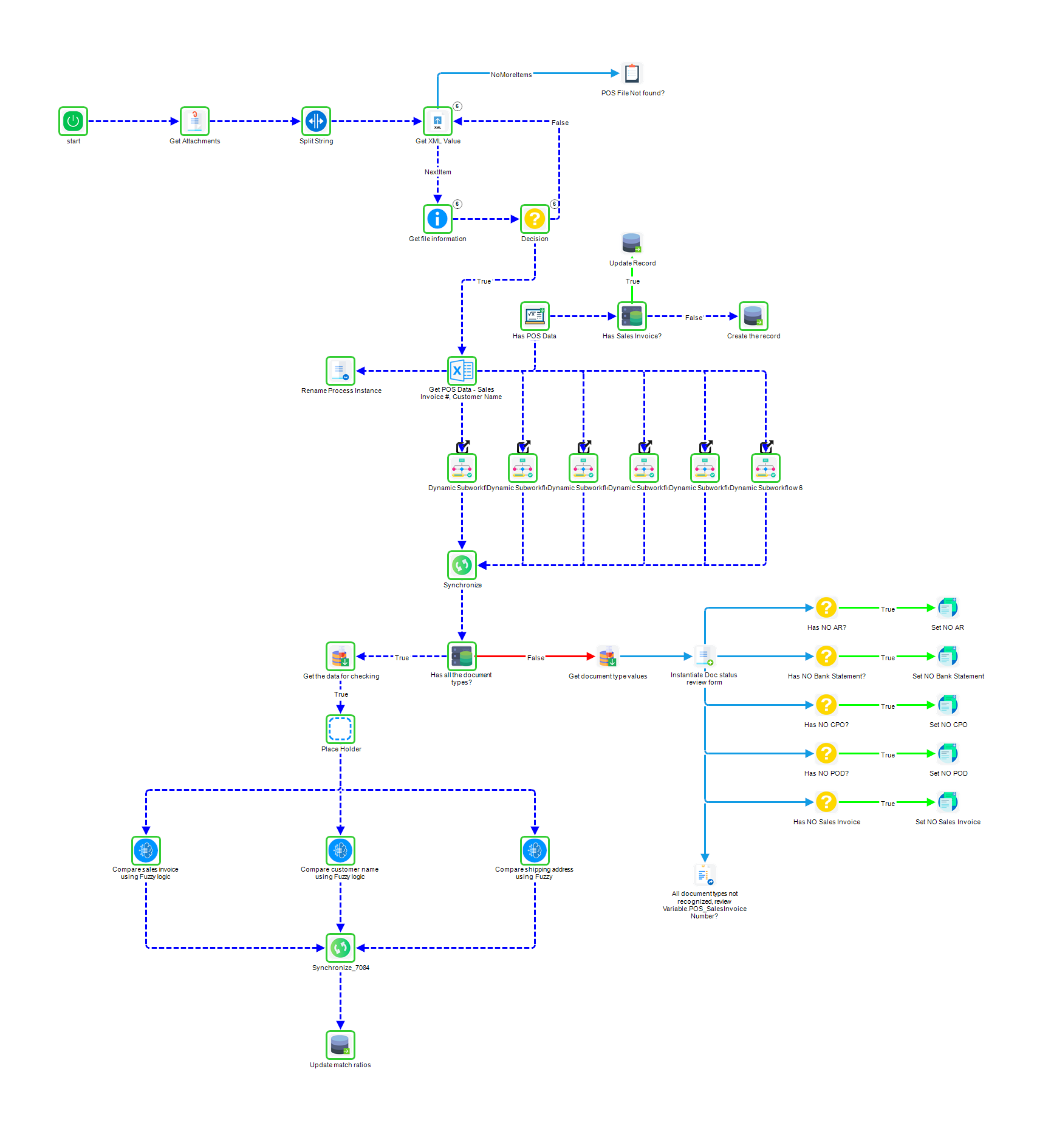
One of the biggest hurdles in process improvement is the gap between the people who know the process and the people who can build the software. FlowWright closes that gap with its graphical, drag-and-drop workflow designer. You can visually map out every step, decision point, and action without writing a single line of code. This approach helps you streamline and support each stage of a process, ensuring clarity and seamless collaboration. It empowers department heads and process owners to take control, turning their operational knowledge directly into functional, automated workflows that the entire team can follow.
Build processes faster with AI
FlowWright takes process design a step further by incorporating an AI Copilot. Instead of starting from a blank canvas, you can simply describe the process you want to build in plain language, and the AI will generate the initial workflow and forms for you. This dramatically speeds up development time and lowers the barrier to entry for creating complex processes. By automating repetitive tasks and standardizing procedures from the very beginning, you can improve consistency, reduce human error, and free up your team to focus on more strategic work rather than getting bogged down in the mechanics of workflow construction.
Integrate with your existing systems
A workflow tool is only as good as its ability to connect with the other software you rely on every day. FlowWright is built as an integration platform as a service (iPaaS), designed to be the central hub that connects all your disparate systems. Whether it's your CRM, ERP, email platform, or custom in-house applications, FlowWright ensures data flows smoothly between them. This is critical because modern workflow software must connect with your existing tools to be effective. By creating a unified ecosystem, you eliminate data silos and manual data entry, leading to a more efficient and cohesive operation across the entire organization.
A look at the top workflow design tools
While FlowWright offers an all-in-one platform for enterprise-level process automation, it’s helpful to know what other tools are out there. Many teams use specialized software for visual planning, diagramming, or project management. These tools often focus on one specific part of the workflow puzzle, like brainstorming or task tracking. Let's walk through some of the most popular options and see where they shine. Understanding their strengths can help you clarify what you truly need—whether it's a simple visual aid or a powerful, integrated automation engine that can handle complex, enterprise-wide processes.
Miro: For collaborative visual planning
Miro is essentially a digital whiteboard built for team collaboration. Its main strength is providing a flexible, visual space for brainstorming and mapping out ideas. The platform uses an "infinite canvas" where your team can build out processes, add sticky notes, and give feedback in real time. According to Miro, their workflow design tool is designed to help you "visualize your team's processes, identify bottlenecks, and document procedures." It’s a great starting point for teams that need to get on the same page visually before diving into the technical details of automation. The focus here is less on execution and more on collaborative planning and ideation.
Creately: For AI-powered diagramming
Creately stands out by incorporating artificial intelligence directly into its diagramming process. If you’re short on time or need a starting point, its AI Workflow Generator can be a huge help. You simply describe the process you want to map out, and the AI builds a visual workflow complete with all the necessary steps, roles, and connections. As Creately explains, the tool is built to help you "create, organize, and carry out workflow diagrams" with AI assistance. This is particularly useful for teams that want to quickly generate standard process maps without building everything from scratch, making the initial design phase much faster.
Lucidchart: For advanced, data-linked diagrams
For teams that need more than just a static flowchart, Lucidchart offers a powerful solution. It’s known for its advanced diagramming capabilities that allow you to create complex, professional-looking charts. One of its most compelling features is the ability to link diagrams to live data sources. This means your workflows can dynamically update as your data changes, providing a real-time view of your processes. This is especially valuable for visualizing data-driven operations where conditions are constantly shifting. Lucidchart bridges the gap between simple diagramming and more complex business intelligence, making it a favorite among data-savvy teams.
Asana: For managing project-based workflows
Asana is less of a workflow design tool and more of a work management platform. It excels at helping teams organize, track, and manage their projects from start to finish. With Asana, you can break down large projects into smaller, manageable tasks, assign them to team members, set deadlines, and monitor progress through different stages. Its interface is clean and user-friendly, making it easy for teams to adopt. While you can visualize a project’s flow, its primary purpose isn't to design or automate complex business processes but rather to ensure project-based work gets done on time.
Trello: For organizing tasks visually
Similar to Asana, Trello is a project management tool that uses a simple, visual approach to task management. It’s famous for its Kanban-style boards, where you can create cards for tasks and move them across columns representing different stages of a process (e.g., To Do, In Progress, Done). This card-based system makes it incredibly easy to see the status of every task at a glance. Trello is fantastic for individuals and small teams looking for a straightforward way to organize their work without a steep learning curve. However, it’s not built for designing or automating the intricate, multi-step workflows that larger organizations rely on.
How do the top tools stack up? A feature comparison
Choosing the right workflow tool isn't about finding a one-size-fits-all solution. It’s about matching the right features to your team’s specific challenges and goals. While some tools are fantastic for brainstorming and visual planning, others are built to power complex, enterprise-wide automation. Let's break down how these top contenders compare across the features that matter most, so you can see where each one truly shines. This will help you look past the marketing and focus on the functionality that will actually make a difference for your business.
Ease of use and team adoption
A tool is only effective if your team actually uses it. For quick adoption, especially among non-technical users, simplicity is key. Tools like Creately are designed with this in mind, offering intuitive drag-and-drop interfaces that let anyone map out a process without a steep learning curve. While this is great for basic diagramming, enterprise needs often require more power. This is where a platform like FlowWright strikes a crucial balance. Its low-code/no-code environment empowers business users to design and manage workflows, while still providing the depth and control that developers need to build sophisticated, scalable solutions.
Customization and flexibility
Your business processes are unique, and your workflow tool should be flexible enough to reflect that. Visual collaboration platforms like Miro excel at providing a freeform canvas where teams can map out ideas and processes in a way that makes sense to them. However, this flexibility is often limited to the diagram itself. For true operational flexibility, you need a tool that can execute those custom workflows. An enterprise-grade platform allows you to build rules, logic, and steps that precisely match your business requirements, turning a simple flowchart into a living, automated process that can adapt as your needs change.
Integration capabilities
No tool works in a vacuum. The ability to connect with your existing software stack is essential for creating a seamless operational flow. Many diagramming tools, including Miro and Creately, offer integrations with popular project management and communication apps like Jira, Asana, and Slack. This is perfect for keeping teams aligned. But for true enterprise automation, you need deeper, more robust connections. A platform like FlowWright functions as a central hub, offering powerful iPaaS solutions that integrate with everything from legacy systems and databases to modern cloud applications, ensuring data moves smoothly and tasks are automated across your entire organization.
Built-in automation features
Automation is where workflow design gets really powerful. Newer diagramming tools are incorporating AI to help you generate workflow charts from simple text prompts, which is a great way to get started quickly. But there’s a big difference between automating a drawing and automating a business process. While visual tools help you plan the work, a true workflow automation engine does the work. Platforms like FlowWright take your designed process and bring it to life, automatically routing tasks, sending notifications, updating records, and executing complex logic without any manual intervention.
Security and compliance standards
When your workflows handle sensitive customer data or critical business operations, security is non-negotiable. While most cloud-based tools offer standard security features, enterprises have a higher bar to clear for compliance and governance. You need to ensure that your automated processes are secure and that data is protected from unauthorized access. This is a core strength of enterprise-focused platforms. They are built from the ground up with features like granular user permissions, detailed audit trails, and adherence to strict compliance standards, giving you the control and peace of mind needed to automate mission-critical operations safely.
Weighing the pros and cons of each tool
Choosing the right workflow tool means looking beyond the feature list and thinking about how it will fit into your company's daily operations. Each platform has its own unique strengths, and the best one for you depends entirely on the complexity of your processes and your goals for automation. Let's break down where each tool shines.
FlowWright's strengths and considerations
FlowWright is built for the enterprise. Its biggest strength is its ability to handle complex, mission-critical business processes with unmatched power and control. While other tools help you visualize a workflow, FlowWright is the engine that actually executes it. The platform is designed for scalability and flexibility, allowing you to enhance efficiency across your entire organization, not just within a single team.
The main consideration is your scale. If you’re a small team looking for a simple task board, FlowWright’s robust feature set might be more than you need. But for organizations that require deep integration, rigorous security, and the power to automate intricate, multi-step processes, FlowWright is in a class of its own.
A side-by-side comparison
When you place these tools side-by-side, their different purposes become clear. Miro, Creately, and Lucidchart are digital whiteboards, perfect for brainstorming and mapping out ideas visually. Asana and Trello are project management platforms that excel at organizing tasks and moving them through a pipeline. They help teams see who is doing what and when.
FlowWright operates on a different level. It takes the process you might design in Lucidchart and turns it into a living, automated system. While all these tools can lead to increased productivity, FlowWright does so by automating the underlying business logic, reducing manual intervention, and ensuring procedures are followed consistently every single time.
Which tools work best for specific industries?
Visual tools like Miro and Creately are fantastic for creative agencies, product development teams, and consultants who need a flexible space for collaboration. Project-based platforms like Asana and Trello are a natural fit for marketing, software development, and content teams managing distinct projects with clear deliverables.
FlowWright’s enterprise-grade capabilities make it the go-to choice for industries with complex compliance and operational needs. Sectors like HR, finance, and healthcare benefit from its robust automation for processes like employee onboarding, invoice approval, and patient data management. It’s also ideal for government, manufacturing, and logistics—any field that relies on auditable, secure, and highly repetitive, data-driven tasks.
How to choose the right tool for your business
With so many options on the table, picking the right workflow design tool can feel overwhelming. The key is to step back from the flashy features and focus on what your business truly needs to succeed, both today and in the future. A tool that works wonders for a small startup might not have the power an enterprise needs, and a complex system might be too much for a team that’s just getting started with automation.
Think of this as a matchmaking process. You’re looking for a long-term partner that can adapt and grow with you. By evaluating each option against your specific requirements, team structure, and budget, you can find a tool that not only solves your current challenges but also sets you up for future innovation. Let’s walk through the four key areas to consider to make sure you find the perfect fit.
Assess your enterprise requirements
Before you start scheduling demos, create a checklist of your must-haves. Every business is different, but there are a few universal factors to consider. Think about scalability—will this tool support you as you grow from 100 processes to 10,000? Also, consider integrations. Your workflow tool shouldn’t be an island; it needs to connect seamlessly with the software you already use. Look for a platform with robust iPaaS solutions to ensure smooth data flow between systems. Don’t forget about security, customization, and mobile access. A clear list of your non-negotiables will help you quickly filter out tools that aren’t right for you.
Consider your team's size and needs
The right tool needs to work for the people who will use it every day. How large is your team, and how do you expect it to grow over the next few years? Choose software that can easily handle more users and a higher volume of tasks as your business expands. Flexibility is just as important. Your business needs will change, and your workflow software should be able to adapt. A platform that’s too rigid will only create new bottlenecks down the road. Look for a solution that allows you to modify processes easily as you learn and optimize your operations.
Match the tool to your technical expertise
Who will be building and managing your workflows? If your team is made up of business users with limited coding experience, a user-friendly, low-code/no-code platform is essential. Look for intuitive interfaces with drag-and-drop functionality that empower everyone to automate their own tasks. However, your developers also need the power to tackle more complex challenges. The ideal tool offers the best of both worlds: simplicity for everyday users and deep functionality for technical experts. This approach ensures company-wide adoption and allows your entire organization to drive innovation.
Plan for your budget and future growth
Workflow software pricing can vary widely, from free plans with basic features to custom enterprise-level packages. While it’s tempting to go for the cheapest option, it’s more important to consider the total value and potential return on investment. A free tool might solve a small problem today, but will it require a costly and complicated migration when you outgrow it? Think about the long-term costs, including how pricing scales as you add users or increase usage. Choose a partner with a transparent pricing model that aligns with your growth projections, ensuring you have a powerful and affordable solution for years to come.
Common implementation challenges (and how to solve them)
Choosing the right workflow design tool is a huge step, but the work doesn’t stop there. Implementing any new software comes with its own set of hurdles. The good news is that with a bit of foresight, you can clear them easily. The most common challenges aren't about the technology itself, but about how it fits with your people and existing processes. By focusing on team buy-in, technical integrations, and a solid training plan, you can ensure a smooth and successful rollout.
Getting your team on board
Let’s be honest: people are often wary of change. A new tool can feel like just another thing to learn, especially if your team is comfortable with the way things are. The key is clear and consistent communication. Don’t just announce the new software; explain why you chose it and how it will make everyone’s work easier. Involve key team members in the rollout process. When people feel they have a stake in the outcome, they’re far more likely to become champions for the new tool, helping you encourage adoption across the organization.
Handling complex system integrations
Your new workflow tool won’t operate in a silo. It needs to communicate with the systems you rely on every day, like your CRM and ERP. This is where things can get technically tricky. A clunky integration creates more problems than it solves, leading to data silos and frustrated employees. Before you begin, map out your tech stack and identify every connection point. Choose a platform with flexible iPaaS solutions that can handle your specific needs. A seamless integration makes the new tool feel like a natural extension of your existing systems.
Creating an effective training plan
You can’t just hand your team a new tool and expect them to master it overnight. A successful launch depends on a thoughtful training strategy that goes beyond a single kickoff session. Create a program that includes hands-on workshops, easy-to-access documentation, and ongoing support. To really make it stick, consider a digital adoption platform for in-app guidance. Most importantly, make sure leadership is visibly on board. When managers actively use and promote the new tool, it signals its importance and motivates everyone to embrace the change.
A guide to pricing and trial options
Choosing a workflow tool is a big decision, and the price tag is a major part of that. The costs can range from free to custom enterprise packages, so it helps to know what you’re getting at each level. Let’s break down the common pricing models and how you can test-drive a platform before you commit.
Finding the best free plans
Many workflow tools offer a free plan, which can be a great way to get a feel for the interface. Platforms like Miro and Creately have "free forever" options that let you explore their basic features without pulling out a credit card. However, these plans often come with limitations. You might find that critical functions for a growing business, like advanced automation, task dependencies, and real-time team collaboration, are reserved for paid tiers. Free plans are perfect for individuals or very small teams just starting out, but they usually aren't a long-term solution for complex enterprise needs.
Understanding premium feature costs
Once you move into paid plans, pricing is typically based on the number of users and the features you need. You’ll often see a tiered structure: a personal or small team plan might cost around $5 to $10 per user per month, while a business plan with more robust features could be in the $20 to $30 range. These premium plans are where you’ll find valuable tools like AI workflow generators that can design processes for you in seconds. The key is to look at what you get for the price—paying a bit more per user might be worth it if it unlocks automations that save your team hours each week.
What to expect from enterprise pricing
For large organizations, enterprise pricing is a different ballgame. Instead of a fixed per-user fee, you’ll likely get a custom quote based on your company’s specific requirements. This model is built for scale. An enterprise plan should be flexible enough to grow with you as you add more users, departments, and complex processes. This is where you get access to advanced security, dedicated support, and the ability to handle high-volume, mission-critical workflows. True enterprise workflow automation is about investing in a platform that can support your long-term digital transformation goals, not just manage a few projects.
Making the most of trial periods
A trial period is your chance to see if a tool really works for your team. Before you start, make a list of your must-have features and a few real-world processes you want to build. Don’t just click around—try to replicate one of your current workflows. Test the no-code builders to see how intuitive they are for non-technical team members. Check if you can easily integrate the platform with the other software your team relies on every day. The goal is to confirm that the tool can solve your actual business challenges before you make a financial commitment.
Real user reviews: What people are saying
Marketing materials can tell you what a tool can do, but user reviews tell you how well it actually does it. When you’re comparing different platforms, spending some time with genuine feedback is one of the smartest moves you can make. It gives you a clear picture of what it’s like to use the software day in and day out. You get to hear directly from people who have already walked the path you're on, facing similar challenges and aiming for similar goals.
As you read through what people are saying, you’ll start to notice a few themes that come up again and again. Users tend to focus on three core areas: how the tool performs under pressure, what the overall user experience is like, and the quality of customer support when they need a hand. These aren't just minor details; they're the factors that determine whether a tool will become a valuable asset for your team or a source of frustration. A platform can have all the features in the world, but if it's unreliable or difficult to use, it won't deliver the results you need. Let's look at what users are highlighting in each of these critical areas.
Feedback on performance and reliability
When your core business processes depend on a piece of software, it simply has to work. Performance and reliability are non-negotiable. Across different platforms, users consistently praise tools that are dependable, especially when handling complex or high-volume workflows. The last thing you want is a system that slows down or crashes during peak business hours.
Reliability means you can build and run automated processes with confidence, knowing the platform can handle the load without constant supervision. Many user reviews of workflow management software emphasize the importance of a stable environment that prevents interruptions and keeps business moving forward. This is especially critical for enterprise-level operations where any downtime can have significant consequences.
Insights into the user experience
A powerful tool is only effective if your team can actually use it. That’s why the user experience (UX) is such a hot topic in reviews. People appreciate a clean, intuitive interface that makes it easy to design, manage, and track workflows. Platforms with visual layouts often get high marks because they help clarify complex processes and improve team collaboration.
The goal is to find a tool that feels empowering, not overwhelming. For example, some of the best workflow management software is praised for offering a seamless experience that allows users to interact with workflows effortlessly. A positive UX leads to faster adoption across your organization and ensures that both technical and non-technical team members can contribute effectively.
Reviews of customer support
Even with the most intuitive software, you’ll eventually have a question or run into a unique challenge. This is where great customer support makes all the difference. Users often highlight positive experiences with support teams that are responsive, knowledgeable, and genuinely helpful. Waiting days for a response simply isn’t an option when a critical process is on the line.
Think of customer support as a partnership. The best companies offer more than just troubleshooting; they provide resources and guidance to help you succeed. Whether you need help with a complex integration or want to understand a new feature, knowing that an expert support team has your back provides invaluable peace of mind and helps you get the most out of your investment.
Related Articles
- HTML5 Graphical Workflow Designer
- .NET Workflow Automation Software For Enterprise Organizations
- How To Effectively & Efficiently Design A Process in FlowWright
- Glossary | Enterprise Workflow Automation Terms
- .NET Workflow Engine Software, .NET Embeddable Workflow Software
Frequently Asked Questions
What’s the real difference between a workflow design tool and a workflow automation platform?
Think of it like the difference between an architect's blueprint and the actual, functioning building. A workflow design tool, like a digital whiteboard, is fantastic for creating the blueprint—visualizing the steps, brainstorming ideas, and getting everyone on the same page. A workflow automation platform is the engine that takes that blueprint and brings it to life, actually executing the tasks, routing approvals, and connecting with your other software to get the work done without manual effort.
Can I just use a project management tool like Asana for my business processes?
You can, but it’s best for a specific type of work. Project management tools are excellent for tracking unique projects with a clear start and finish, like a marketing campaign or a product launch. Workflow automation platforms are built for repeatable, ongoing business processes that need to be executed the same way every time, such as processing invoices, onboarding new hires, or managing document approvals. One manages projects; the other runs your operations.
My team has business experts, not developers. Can they still build automated workflows?
Absolutely. This is exactly why low-code and no-code platforms were created. Modern workflow tools use intuitive, drag-and-drop visual designers that allow the people who understand the business process best to build and modify the automation themselves. This empowers your team to turn their operational knowledge directly into a functional solution without having to write a single line of code.
How do I know when my business needs more than a simple diagramming tool?
You'll likely see a few clear signs. The first is when your visual maps become a source of truth that no one follows because they require manual work to execute. Another sign is when you find your team is still manually entering data between different systems, even with a clear process map. If you need to enforce business rules, ensure compliance, or connect your workflow to other software like your CRM or ERP, it’s time to look at a true automation platform.
What's the biggest mistake to avoid when implementing a new workflow tool?
The most common mistake is focusing entirely on the technology while forgetting about the people who will use it. A successful rollout depends on getting your team on board from the very beginning. Instead of just announcing a new tool, explain how it will make their specific jobs easier and involve them in the process. When your team understands the "why" and feels a sense of ownership, adoption happens naturally.
See of FlowWright IDP in action. Let's customize your free proof of concept (POC).
Why FlowWright?
Platform
Resources
Socials
Reviews
















