
How Form Flow Software Automates Your Workflows
Building a more efficient process shouldn't always require a developer. The people who know a workflow best are often the ones who use it every day, but they may not have the technical skills to build a solution from scratch. This is why modern
form flow software is such a game-changer for businesses. With intuitive, low-code platforms, you can empower your teams to design, build, and automate their own workflows using simple drag-and-drop tools. This approach closes the gap between a business need and a technical solution, allowing you to create smarter, more effective processes much faster.
Key Takeaways
- Automate the Entire Workflow, Not Just the Form: The real power of this software is what happens after a user hits "submit." It automatically routes information, triggers approvals, and updates other systems, turning a static form into the starting point for a complete, hands-off process.
- Prioritize Features That Drive Automation: Focus on tools that empower your team, like drag-and-drop builders, conditional logic for smarter forms, and robust integrations. These features are essential for connecting your tech stack and building workflows that run on their own.
- Solve Core Business Challenges Directly: By implementing form flow software, you can eliminate manual data entry errors, reduce compliance risks with secure and auditable trails, and free up your team from repetitive tasks, leading to significant time and cost savings.
What is Form Flow Software?
At its core, form flow software is a tool that transforms static online forms into dynamic, automated workflows. It goes far beyond the basic contact or survey forms you might be used to. Instead of just collecting data and dropping it into a spreadsheet, this software allows you to build interactive and personalized experiences that guide users through a process step-by-step. Think of it as the bridge between data collection and action. When a user fills out a form, the software can instantly trigger a sequence of events, like routing an application to the right department, sending a confirmation email, or updating a customer record in your CRM.
The real power lies in its ability to digitize complex paper-based processes without needing to write a single line of code. With a low-code/no-code platform, anyone on your team can design and deploy sophisticated forms that adapt to user input and integrate seamlessly with your other business systems. This turns a simple data entry task into an intelligent, automated part of your operations, making it easier to manage information, reduce manual work, and ensure processes run smoothly from start to finish. It’s about making your forms work for you, not the other way around.
What It Does and Why It Matters
The main goal here is to streamline how you gather and use information. Form flow software helps you generate more qualified leads and improve form completion rates by making the user experience much smoother. When forms are intuitive and interactive, people are more likely to finish them. It also centralizes all your form responses, giving you a single place to manage and analyze data. With built-in analytics, you can track how your forms are performing, identify bottlenecks, and make data-driven decisions to optimize your business processes. This isn't just about collecting data; it's about collecting better data and using it to drive real results.
How It Automates Data Collection
Automation is where form flow software truly shines. Using a simple drag-and-drop builder, you can create intelligent forms with complex rules without any technical expertise. A key feature is conditional logic, which dynamically changes the form based on a user's answers. For example, if a customer selects "technical support," the form can automatically display a new set of questions relevant to their issue. This creates a personalized path for every user. You can also implement features like A/B testing to see which version of a form performs better and use built-in calculators for tasks like quoting prices. These intelligent automation tools make data collection more efficient and accurate.
Must-Have Features in Form Flow Software
When you’re looking for software to manage your forms and workflows, it’s easy to get overwhelmed by long feature lists. But not all features are created equal. The right tools don't just help you build a form; they help you build a smarter, more efficient process from start to finish. True form flow software is designed to handle complex business logic, integrate with your existing tech stack, and give you the data you need to make informed decisions. Let’s walk through the essential features that separate a basic form builder from a powerful automation engine.
Drag-and-Drop Builders and Conditional Logic
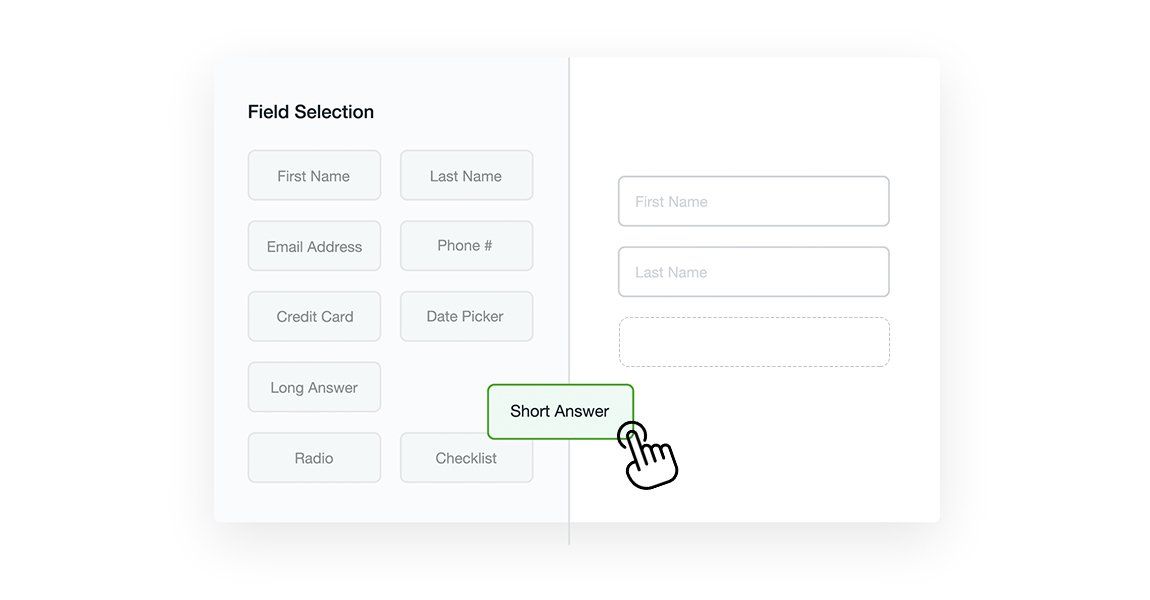
The best form flow software is accessible to everyone on your team, not just the developers. A visual, drag-and-drop builder is a must-have because it allows you to create and modify forms without writing a single line of code. This empowers business users to build what they need, freeing up IT resources for more complex tasks.
But a pretty interface isn't enough. The real magic happens with conditional logic. This feature lets you create dynamic forms that adapt in real time based on user input. For example, if a user selects "Other" in a dropdown menu, a new text field can instantly appear for them to provide more details. This keeps your forms clean, relevant, and less intimidating for the user, which directly improves completion rates. It’s the key to building intelligent, responsive data collection experiences.
Automated Triggers and Multi-Step Forms
A form is often just the first step in a much larger process. That’s where automated triggers come in. This feature allows you to define what happens after a user hits "submit." An effective platform lets you automatically kick off entire workflows, such as routing a lead to the right sales rep, sending a confirmation email, or creating a task in your project management tool. This is the core of automation—it eliminates manual hand-offs and ensures no task falls through the cracks.
For longer or more complex forms, breaking them into smaller, digestible pieces is crucial. Research shows that multi-step forms can increase completion rates significantly. By guiding users through a process one step at a time, you reduce friction and make the experience feel more manageable. A progress bar can also help set expectations and encourage users to complete the entire form.
Real-Time Analytics and A/B Testing
How do you know if your forms are actually effective? You need data. Look for software that provides real-time analytics and dashboards to track key metrics like submission rates, drop-off points, and the average time it takes to complete a form. These insights are invaluable for identifying bottlenecks and areas for improvement. Without analytics, you’re just guessing at what works.
For teams focused on optimization, A/B testing capabilities are a game-changer. This feature lets you test different versions of a form—maybe with a different headline, button color, or set of questions—to see which one performs better. By systematically testing and refining your forms, you can make data-driven decisions that lead to better user experiences and higher conversion rates. It’s a scientific approach to improving your processes.
Seamless System Integration
Your forms and workflows don’t operate in a silo. The data you collect needs to flow smoothly between all the different applications your business relies on, from your CRM to your accounting software. That’s why robust integration capabilities are non-negotiable. The right software should offer a library of pre-built connectors to popular tools and a powerful API for creating custom connections.
This ability to connect your entire tech stack is what transforms a simple form into a central part of your business operations. When your form flow software can talk to your other systems, you can automate data entry, reduce errors, and create a single source of truth for your information. This level of connectivity, often found in iPaaS solutions, is essential for building scalable, enterprise-grade workflows.
What Are the Benefits of Form Flow Software?
When you think about forms, you might picture simple contact fields or basic surveys. But form flow software transforms these static data-entry points into dynamic, intelligent engines for your business processes. Instead of just collecting information, this software automates what happens next. It routes data to the right people, triggers actions in other systems, and kicks off entire workflows, all without manual intervention. This shift from passive data collection to active process automation is where the real value lies.
By implementing form flow software, you’re not just getting a better form builder; you’re adopting a strategic tool for digital transformation. The benefits extend across your entire organization, from marketing and sales to HR and operations. You can create seamless experiences for your customers, streamline internal operations, and ensure your data is both secure and actionable. It’s about making every interaction, whether with a customer or an employee, more efficient, intelligent, and impactful. This automation frees up your team from repetitive tasks, reduces the risk of human error, and provides clear visibility into your processes, helping you make smarter decisions faster.
Generate More Leads and Conversions
Your forms are often the first real interaction a potential customer has with your brand. If that experience is clunky or confusing, you risk losing them for good. Form flow software helps you create interactive and personalized forms that guide users through the process, making it feel less like a chore and more like a conversation. By using features like conditional logic, you can show only relevant questions, shortening the form and reducing friction. This leads to higher completion rates, which means more qualified leads for your sales team and more conversions for your business. It’s a direct path to improving your bottom line, simply by making your data collection smarter.
Create a Better User Experience
A positive user experience is non-negotiable. Modern form flow software ensures your forms look great and function perfectly on any device, from desktops to smartphones. Fast load times and a clean, intuitive design prevent user frustration and abandonment. Advanced tools like FlowWright's graphical forms designer allow you to build multi-step forms that break down complex requests into manageable chunks. This approach is less intimidating for the user and can significantly increase the number of people who successfully complete the form. When you respect your user’s time with a seamless experience, you build trust and encourage engagement.
Simplify Data Management and Compliance
Once data is submitted, where does it go? With form flow software, you can stop chasing down information in spreadsheets and email inboxes. All responses are centralized in one secure location, complete with analytics to track performance. This makes it easy to manage, search, and report on your data. For enterprises, security is paramount. These platforms are built with strong encryption and hosted on secure infrastructure to protect sensitive information. By automating data handling, you also reduce the risk of manual entry errors and create a clear audit trail, which is essential for maintaining compliance with industry regulations.
Save Time and Money with Automation
The most significant benefit of form flow software is its ability to automate entire workflows. When a form is submitted, the software can automatically route it for approval, create a task in your project management tool, update a customer record in your CRM, and send a confirmation email. This level of automation eliminates countless hours of manual administrative work, freeing up your team to focus on strategic initiatives. By streamlining processes and reducing the need for manual intervention, you not only accelerate your operations but also achieve substantial cost savings over time.
Form Flow Software vs. Traditional Form Builders
You might be thinking, "I already have a form builder. Why do I need something else?" It's a fair question. Basic form tools are great for simple tasks like a website contact form or a quick survey. But when your forms are tied to critical business processes—like client intake, purchase orders, or employee onboarding—the limitations of standard builders become clear. They act as simple collection buckets, but they don't help you manage the complex journey your data needs to take afterward. This is where form flow software steps in, transforming a static data entry point into a dynamic, automated workflow.
Why Standard Form Tools Fall Short
Traditional form builders often operate in a silo. They capture information but leave the next steps up to you and your team, which usually means manual data entry, emails, and spreadsheets. This approach is prone to mistakes. Poor form design can lead to abandoned transactions, data collection errors, and frustrated users, which directly impacts your results. When forms are disconnected from your core systems, you also run into issues with outdated data and faulty outputs. You end up spending more time fixing errors and chasing down information than on the work that actually matters.
The Power of Advanced Automation and AI
Form flow software picks up where traditional builders leave off. It’s not just about creating a form; it’s about designing the entire process that follows. When a user hits "submit," the software automatically routes the data, triggers approvals, and updates other systems. This is possible because it’s part of a robust process automation platform that offers a complete digital solution for data management. With the addition of an AI Copilot, you can build these intelligent workflows even faster, letting the system handle the heavy lifting of process design and data handling.
Enterprise-Ready Security and Scalability
For any organization handling sensitive information, security isn't just a feature—it's a requirement. Standard form tools often lack the enterprise-grade security and compliance features needed to protect data from unauthorized access. Form flow software built for business use prioritizes this. By adhering to industry-specific compliance requirements and implementing best-in-class security measures, you can automate processes with confidence, knowing your data is safe. This also applies to scalability. As your company grows, your processes will become more complex and involve more people, and you need a platform that can grow with you without breaking.
What Workflows Can You Automate?
When you think of forms, you might picture a simple "contact us" page. But with form flow software, you're working with something much more powerful. This technology is designed to handle complex, multi-step processes that are central to how your business runs. It’s about taking the manual, often repetitive tasks that slow down your teams and transforming them into streamlined, automated workflows. From the moment a potential customer shows interest to the day a new employee joins your team, form flow software can manage the entire sequence of events.
Instead of relying on emails, spreadsheets, and manual follow-ups, you can build intelligent pathways that guide information exactly where it needs to go. This applies across your entire organization—sales, marketing, HR, finance, and operations can all benefit. The right platform provides a suite of automation features that connect different steps, trigger actions in other systems, and give you a clear view of every process. It’s less about just collecting data and more about putting that data to work instantly. Let’s look at a few specific examples of workflows you can automate.
Lead Qualification and Routing
Your sales team’s time is valuable, and they shouldn't spend it chasing down unqualified leads. Form flow software helps you create interactive and dynamic forms that do the initial screening for you. Using conditional logic, your forms can ask follow-up questions based on a prospect's answers, like their company size, industry, or budget. Based on this information, the workflow can automatically score the lead and route it to the right person or sales pipeline in your CRM. This means high-value leads get an immediate response from the most appropriate sales rep, while others might be added to a nurturing campaign, all without any manual intervention.
Employee Onboarding and HR Tasks
Bringing a new employee into the company involves a mountain of paperwork and a long checklist of tasks. Form flow software can consolidate this entire process into a single, seamless digital experience. You can build a comprehensive onboarding workflow that guides new hires through filling out personal information, signing policy documents electronically, and enrolling in benefits. The system can automatically notify IT to set up their accounts, inform their manager to schedule introductory meetings, and track completion of each step. This not only creates a more professional and welcoming experience for your new team member but also frees up your HR department from tedious administrative follow-up.
Customer Feedback and Support Tickets
Effectively managing customer inquiries and support requests is key to retention. With form flow software, you can create smart forms that capture all the necessary details right from the start. When a customer submits a support ticket, the form can ask clarifying questions to categorize the issue—is it a technical bug, a billing question, or a feature request? The workflow can then automatically create a ticket in your helpdesk system, assign it to the correct department, and send an automated confirmation to the customer. This ensures a faster response time and helps you manage all your form responses and analytics in one place to spot trends in customer feedback.
Document Approvals and Compliance
Waiting for approvals on documents like contracts, purchase orders, or invoices can create major bottlenecks in your operations. An automated workflow solves this by establishing a clear, digital approval chain. When a document is submitted, the system automatically routes it to the first approver. Once they sign off, it moves to the next person in the sequence, sending notifications and reminders along the way. This creates a complete, time-stamped audit trail for every document, which is essential for maintaining compliance. You get a robust process automation platform that provides the visibility and control needed to keep business-critical approvals moving forward without delays.
Common Challenges Form Flow Software Solves
If you’ve ever spent an afternoon manually transferring data from a form into a spreadsheet, you know how tedious and error-prone it can be. These small, repetitive tasks add up, creating bottlenecks that slow down entire departments. Traditional forms might capture information, but they often create more work on the back end. This is where the real power of form flow software comes into play—it doesn't just collect data; it intelligently moves that data where it needs to go, instantly.
This kind of automation tackles some of the most persistent operational headaches. It’s about more than just convenience; it’s about building resilient, efficient processes that can grow with your business. By automating the entire journey of a piece of information—from submission to final action—you can eliminate manual errors, simplify complex compliance requirements, and ensure your systems can handle increasing demand. A robust process automation platform is designed to solve these exact issues, turning clunky workflows into streamlined, reliable operations.
Eliminate Manual Data Entry Errors
We’ve all been there—a typo in an email address, a misplaced number in a phone number, or a required field left blank. Manual data entry is a breeding ground for small mistakes that can cause big problems down the line. Poor form design often leads to frustrated users and a high rate of data collection errors, which can compromise everything from sales follow-ups to product delivery.
Form flow software directly addresses this by building intelligence into the forms themselves. Features like real-time data validation check for correct formatting as the user types, while conditional logic shows or hides fields based on previous answers, ensuring you only ask for relevant information. By automating the data capture and transfer process, you remove the risk of human error, leading to cleaner, more reliable data across all your systems.
Reduce Compliance Risks and Integration Headaches
In any industry, maintaining compliance and ensuring data security is non-negotiable. Businesses must ensure their workflows are secure and that sensitive information is protected from unauthorized access. Manually routing forms with personal or financial data is a significant risk, as it’s difficult to track who has accessed the information and when. Form flow software creates standardized, auditable trails for every submission, automatically routing data to the right people for approval and storage.
Beyond security, disconnected systems create frustrating data silos. Form flow software acts as the central hub, using powerful iPaaS solutions to connect your forms to other business-critical applications like your CRM, ERP, or marketing platforms. This seamless integration ensures data flows automatically between systems, eliminating manual exports and imports while keeping all your records perfectly in sync.
Overcome User Adoption and Scalability Hurdles
Introducing any new tool can be met with resistance, especially if it seems complicated. One of the biggest hurdles to successful automation is getting your team on board. Modern form flow software is often built on low-code or no-code principles, featuring intuitive drag-and-drop interfaces that empower non-technical team members to build and manage their own automated workflows. When users feel ownership over the process, adoption happens naturally.
Another common challenge is scalability. A workflow that works for a small team can easily break under the pressure of company growth. Form flow software is designed to scale with you. Whether you’re processing ten customer support tickets a day or ten thousand, the underlying workflow engine can handle the volume without slowing down, ensuring your processes remain efficient as your business expands.
How to Choose the Right Form Flow Software
Selecting the right form flow software isn't just about finding a tool to build online forms; it's about choosing a platform that can fundamentally change how your business operates. The best software acts as a central hub, connecting data collection with the rest of your business processes to create smooth, automated workflows. As you evaluate your options, focus on solutions that are powerful enough to handle complex enterprise needs yet flexible enough for your teams to adopt easily. Look for a platform with a comprehensive set of features that address not only your current challenges but can also scale with you as your business grows and your automation needs evolve.
Low-Code/No-Code and Mobile-First Design
Your form flow software should empower the people who know the processes best—and that’s not always a developer. A low-code or no-code platform allows business users to build, deploy, and modify forms and workflows using intuitive drag-and-drop interfaces. This approach dramatically speeds up development cycles and reduces the burden on your IT department. It means your marketing team can quickly create a new lead capture form or HR can adjust the onboarding workflow without writing a single line of code. Equally important is a mobile-first design. Your employees, customers, and partners interact with your business on phones and tablets, so every form must provide a seamless experience on any screen size.
Robust Security and Real-Time Validation
In any business, data security is non-negotiable. When choosing a platform, look for enterprise-grade security features like end-to-end encryption to protect sensitive information both in transit and at rest. Your software must help you meet compliance standards relevant to your industry, whether it's HIPAA, GDPR, or SOC 2. Beyond security, the platform should ensure data quality from the moment of entry. Real-time validation is a key feature here. It automatically checks that information is in the correct format—like a valid email address or phone number—before the form is submitted. This simple step prevents errors, cleans up your data, and saves your team from fixing manual entry mistakes later.
Customizable Templates and Dashboards
While starting with a template is helpful, your business has unique needs and a distinct brand identity. The right software will offer a library of templates that are fully customizable. You should be able to easily adjust layouts, add your company’s branding, and modify fields to perfectly match your specific workflow requirements. But collecting the data is only half the battle. You also need to understand it. Look for software with customizable dashboards that provide real-time analytics on form performance. This allows you to track key metrics, monitor submissions, and gain actionable insights to continuously refine your processes and improve user experience.
Powerful Integrations and Automation
A form is rarely the final step in a process. The data it collects needs to trigger actions and move seamlessly between your other business-critical systems. This is where powerful integration capabilities are essential. A top-tier platform will offer a wide range of pre-built connectors for popular applications like CRMs, ERPs, and cloud storage, along with a robust API for custom connections. By leveraging these iPaaS solutions, you can ensure your form flow software communicates effortlessly with your existing technology stack. This ability to connect systems is what transforms a simple form into a fully automated, end-to-end business workflow.
Best Practices for High-Converting Forms
Creating a form that people actually want to fill out is both an art and a science. The design of your form directly impacts your conversion rates, user experience, and the quality of the data you collect. A clunky, confusing, or overly long form is a fast track to user frustration and abandonment. On the other hand, a streamlined, intuitive form can significantly improve lead generation, simplify data management, and make your internal processes run much smoother.
The good news is that you don’t need to be a UX designer to build effective forms. By following a few core principles, you can create experiences that are clear, simple, and efficient. Modern form flow software is designed to help you implement these best practices with ease, often using low-code or no-code interfaces. Whether you're building a lead capture form for your website or an internal workflow for employee onboarding, focusing on the user's perspective is the key to success. Let's walk through some actionable steps you can take to make your forms work harder for you.
Keep Forms Short and Simple
Here’s the golden rule: only ask for what you absolutely need. Every field you add to a form increases the time and effort required from the user, which can lead to them giving up halfway through. Before you build your form, map out the essential information required to complete the task. Can you get their job title later? Do you really need a phone number right now? Limiting your form to just the essentials reduces the cognitive load on users and makes the process feel less like a chore. This simple change shows you respect their time and can dramatically increase your completion rates. With a tool like FlowWright's graphical forms designer, you can easily create clean, focused forms that capture exactly what you need without overwhelming the user.
Guide Users with Progress Bars and Clear Instructions
For longer or multi-step forms, managing user expectations is crucial. No one likes to feel like they’re stuck in a never-ending process. This is where progress bars come in. A simple visual indicator showing users where they are in the process ("Step 2 of 4") can reduce anxiety and encourage them to finish. It gives them a sense of accomplishment and a clear idea of the remaining commitment. Paired with clear, concise instructions and labels for each field, you can create a guided experience that feels effortless. These form best practices help eliminate confusion and user frustration, ensuring you get the data you need without friction.
Optimize for Mobile and Always Test
A significant portion of your users will likely interact with your forms on a mobile device. If your form isn't optimized for smaller screens, you're creating a poor experience and losing out on valuable submissions. Responsive design is non-negotiable. This means your form should automatically adjust to fit any screen size, with large, easy-to-tap buttons and legible text. But building it is only half the battle. You should always test your forms across different devices and browsers before launching. This helps you catch any layout issues or functional bugs that could prevent a user from completing the form. By creating effective workflow forms with a mobile-first mindset, you ensure a seamless experience for everyone, no matter how they access it.
What's the Investment? A Look at Pricing
Choosing the right software often comes down to the budget. While it’s tempting to just compare monthly fees, the true cost and value of form flow software involve a bit more. Understanding how companies structure their pricing, how to measure the return on your investment, and what the total cost really looks like will help you make a much smarter decision for your team. Let’s break down what you can expect when you start looking at pricing pages.
Common Pricing Models
Most form flow software is sold on a subscription basis, with tiered plans designed to fit different business sizes and needs. You’ll typically see pricing structured around usage, such as the number of form submissions you can receive each month. For example, a starter plan might allow for 1,000 monthly submissions, while a pro plan could accommodate 7,500 or more. This model allows you to pay for what you use and scale up as your company grows. FlowWright plans include unlimited forms across all user-based tiers, so you’re not penalized for building out your processes.
Evaluating ROI and Free Trials
How do you know if the software is worth the price? The best way to find out is to try it yourself. Most providers offer a free trial, giving you a chance to test the platform with your own team and workflows before making a commitment. Use this trial period to build a few forms, set up an automation, and see how it integrates with your existing systems. This hands-on experience is the most effective way to calculate the potential ROI. Think about the time saved on manual data entry, the reduction in errors, and the potential increase in lead conversions. A successful trial should give you clear evidence of how the software will improve efficiency and contribute to your bottom line.
Understanding the Total Cost of Ownership
The monthly subscription fee is just one piece of the puzzle. To get a complete picture of your investment, you need to consider the Total Cost of Ownership (TCO). This includes the base price plus any additional costs required to get the software running effectively for your team. For instance, do you need a custom training package for your employees? Will you need to pay extra for mobile application access or specific high-level integrations? Factoring in these potential expenses for implementation, training, and support from the start ensures there are no surprises down the road. A clear understanding of the Total Cost of Ownership helps you budget accurately and choose a solution that truly fits your financial and operational needs.
How to Get Started with Form Flow Software
Jumping into new software can feel like a huge undertaking, but it doesn’t have to be. By breaking down the process into a few manageable steps, you can set your team up for a smooth and successful rollout. The key is to start with a clear plan, get your systems and people aligned, and then track your progress to see the impact. This approach ensures you’re not just adding another tool but truly transforming how your business operates.
Plan Your Automation Strategy
Before you automate a single task, you need a strategy. A great plan starts with identifying the biggest pain points in your current processes. Where are the bottlenecks? What manual tasks are eating up the most time or causing the most errors? Start with one or two high-impact workflows instead of trying to overhaul everything at once. To tackle these issues effectively, you need a robust process automation platform with strong modeling and visualization capabilities. This allows you to map out your ideal workflow and see exactly how automation will improve it before you build anything. A clear strategy is the foundation for avoiding common process automation challenges and achieving your goals.
Set Up Integrations and Train Your Team
Your form flow software shouldn't operate in a silo. For automation to be truly effective, it needs to connect with the other tools you already use, like your CRM, ERP, or cloud storage. By leveraging APIs, connectors, and pre-built integrations, you can ensure your automated workflows seamlessly interact with your existing technology stack. This creates end-to-end process automation without disrupting your current operations. Once the technical setup is complete, focus on your team. Provide thorough training and clear documentation so everyone understands how to use the new system and why it’s being implemented. Empowering your team is just as important as the technology itself.
Measure Success and Track Key Metrics
How do you know if your new software is actually working? You have to measure it. Before you launch, define what success looks like by establishing key performance indicators (KPIs). You can measure the success of your workflow automation by tracking metrics like reduced form processing time, fewer data entry errors, and improved employee productivity. These aren't just numbers on a dashboard; they represent tangible benefits like faster customer response times and significant cost savings. Regularly review these metrics to see what’s working, identify areas for improvement, and demonstrate the clear return on your investment to company leadership.
Related Articles
- Best Forms Automation Software .NET workflow process software
- .NET Workflow Automation Software For Enterprise Organizations
- German|Dutch Biz Process Automation Page|FlowWright|US
Frequently Asked Questions
How is form flow software different from a standard form builder?
Think of it this way: a standard form builder is like a digital mailbox. It’s great at collecting information in one place. Form flow software, on the other hand, is like the entire postal service. It not only collects the information but also automatically sorts it, routes it to the correct destination, and triggers the next required action, whether that’s sending a notification or updating another system. It’s focused on the entire process that happensaftersomeone clicks "submit."
Do I need to be a developer to build these automated workflows?
Not at all. The best platforms are built on low-code or no-code principles, which means they are designed for the people who actually run the business processes. Using visual, drag-and-drop tools, you can map out and build complex workflows without writing a single line of code. This empowers your team to create the solutions they need, freeing up your IT department to focus on more technical challenges.
Can this software integrate with the other business tools my company already uses?
Yes, and this is one of its most critical features. Your forms don't exist in a vacuum, and your data needs to move freely between systems. A strong form flow platform is designed to be a central hub for your operations. It connects seamlessly with your other essential applications, like your CRM, accounting software, or project management tools, ensuring that your data is always consistent and up-to-date everywhere.
We have so many manual processes. Where is the best place to start?
It's easy to get overwhelmed, so the key is to start small and focus on impact. Look for a process that is highly repetitive and rule-based, like routing customer support tickets or getting simple document approvals. These are often the source of major bottlenecks. Automating one of these workflows first will give you a quick, measurable win and build momentum for tackling more complex processes down the road.
How does this software ensure the security of our sensitive data?
Enterprise-grade platforms are built with security as a top priority because they are designed to handle confidential information. They use features like data encryption to protect information as it moves and while it's stored. They also provide detailed audit trails, so you have a clear record of every action taken within a workflow. This creates a secure, compliant environment for automating processes that involve sensitive customer, employee, or financial data.